
Microsoft is switching Copilot on across Microsoft 365 tenants at speed, usually because the licensing is already in place and the productivity case is easy to make. The question security teams keep asking is simple. Is it safe?
The honest answer has two parts. At the platform level, Copilot is built sensibly. Your data stays inside your tenant, the foundation models are not trained on your content, and Copilot honours the access controls you already have. The risk sits somewhere less comfortable. Copilot inherits every permission your staff hold, and it makes the data behind those permissions instantly findable. Any oversharing you already have stops being theoretical and becomes a search result.
So Copilot is as safe as your permissions and your governance. For most organisations, that is the problem.
How Copilot actually reaches your data
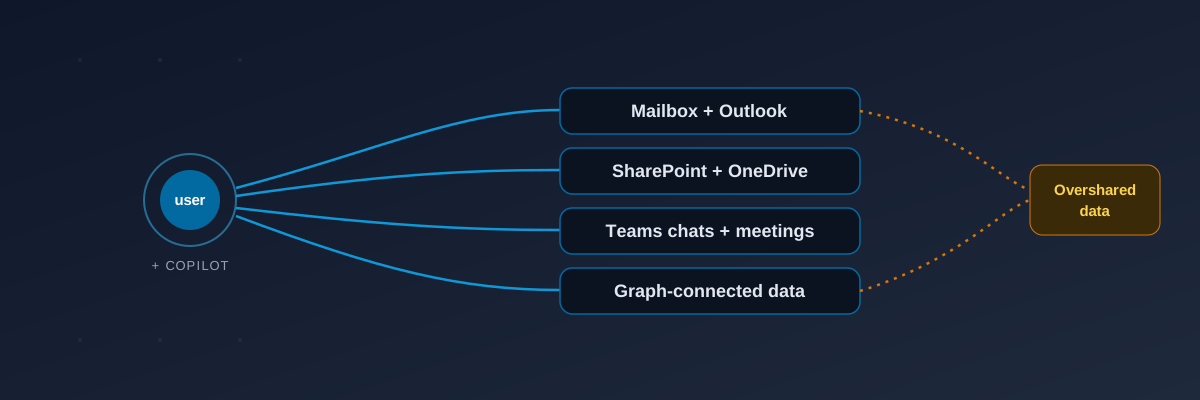
Copilot does not get its own special access. It acts as the signed-in user. Whatever that person can open, Copilot can read, summarise, and quote back in a prompt response.
For a typical employee that footprint is large. Their mailbox. Their OneDrive. Every SharePoint site and shared drive they have rights to. Teams chats and meeting recordings they are part of. Data reachable through Microsoft Graph connectors. None of this is new access. What is new is the speed and reach. A file that was buried five folders deep in a site nobody visits was always reachable in theory. Now it answers a question in seconds.
Where the leakage risk really sits
The model is rarely the problem. The tenant is. A few patterns come up in almost every environment.
Oversharing through inherited permissions. Years of accumulated access build up in any tenant. Broad security groups, sites shared with everyone, broken inheritance where a subfolder quietly grants wider rights than its parent. Copilot turns all of that into fast, natural-language retrieval. Sensitive documents reach people who were never meant to see them, and no one had to do anything wrong for it to happen.
Sensitivity labels that do not cover the back catalogue. Labelling is often solid on new content and patchy on everything created before the policy existed. Copilot can summarise unlabelled sensitive material, and its output does not always carry a label forward, so classified content can come out the other side unclassified.
Controls written for a different threat. Data loss prevention rules were designed for email and endpoints. An AI assistant that reads and recombines content across a user's whole footprint is a different shape of risk. Without Copilot-aware controls, the assistant can move sensitive content into a summary, a chat, or a document in ways traditional rules never anticipated.
Meeting and chat content. Copilot can summarise Teams meetings and threads. Confidential discussions, the kind people are franker in than they would be in a document, become searchable text that can be quoted back later.
Weak audit trails. Many tenants cannot answer a basic question after the fact: what did Copilot surface, for whom, and when? If you cannot reconstruct that, you cannot investigate an incident or evidence control to anyone who asks. This is the same gap we cover in our work on building an AI audit trail for compliance.
Why this matters more for regulated firms
For an FCA or PRA-regulated firm, the exposure is not only a security problem. It is a governance one. Supervisors expect firms to show where and how AI touches data and decisions affecting clients. If Copilot can reach client records, advice files, or trading data across a user's footprint, and you cannot evidence what it surfaced or who saw it, that is exactly the kind of gap a regulator or an insurer will press on. SRA-regulated law firms and healthcare providers face the same logic with privileged and patient data.
Knowing what Copilot can reach is part of demonstrating control. It connects directly to the broader job of building an AI governance framework for the enterprise, where the rule is the same: you cannot govern what you have never mapped.
How to make Copilot safe to switch on
Treat the rollout as a data-governance project, not a licensing toggle. The work falls into a clear order.
Start by measuring what Copilot can currently reach for a representative user, before you enable it widely. That tells you the size of the problem in concrete terms. Then tighten permissions and fix broken SharePoint inheritance so the back catalogue is no longer wide open. Complete sensitivity labelling on the content that matters most. Put Copilot-aware data loss prevention and access controls in place. Finally, confirm you have audit logging for Copilot interactions that you could actually stand behind in a review.
The order matters because every later step depends on knowing what is exposed now. A policy written without that picture is a guess.
Find your real exposure first
The fastest way to scope all of this is to see what Copilot can actually surface in your tenant today. Our Microsoft 365 Copilot Risk Assessment does exactly that: it maps what a typical user can reach through Copilot, the permission sprawl and label gaps behind it, and a prioritised remediation plan. If your AI exposure runs wider than Copilot alone, across ChatGPT, Gemini, and developer tools, the cross-tool AI Data Leakage Risk Assessment covers the full picture, and our explainer on what an AI data leakage assessment finds walks through what to expect.
Copilot can be safe. Whether it is safe in your tenant depends entirely on what it can reach, and most organisations have never looked.